Tag: pillar

  • The Complete Beginner’s n8n Guide to Workflow Automation

    The Complete Beginner’s n8n Guide to Workflow Automation

    n8n is one of the few genuine bits of magic I’ve experienced in automation.

    The problem is, when I started learning it, there weren’t many resources beyond YouTube videos, and a lot of those built workflows with 50 nodes for something that could’ve been done in 10.

    n8n keeps growing too, and I wouldn’t be surprised if some of what takes 10 nodes today gets done in 5 a year or two from now.

    There wasn’t enough material out there for someone without a technical background, so I taught myself everything from scratch.

    I documented all of it in Obsidian, every way to install n8n, Docker, npm, all of it, every core module I had to actually master, every dark corner nobody bothered writing about.

    I went through all of it to automate my own businesses.

    That’s why this guide exists.

    Not another video where someone tells you to comment “workflow” and DM them for the file.

    Not another overcomplicated tutorial stacking nodes you don’t need.

    This is everything I learned the hard way, laid out in the order you’ll actually need it. Consider this your one source of truth to get onboard with n8n properly.

    What Is n8n? The Short Answer

    n8n is an open-source workflow automation tool that connects apps, APIs, and AI models through a visual, node-based editor, no code required.

    You build a workflow by chaining nodes together:

    • a trigger node starts it (a schedule, a webhook, a new row in a spreadsheet),
    • action nodes do the work (send an email, call an API, update a database),
    • logic nodes control which path the data takes (conditions, loops, merges).

    You can self-host n8n for free on your own server, or use n8n Cloud if you don’t want to manage infrastructure yourself.

    Getting comfortable with n8n comes down to five things, in order:

    • installation,
    • the core building blocks,
    • credentials,
    • error handling
    • connecting real services.

    Everything else builds on top of that foundation.

    Should You Use n8n? Where It Actually Fits

    Before you install anything, it helps to know what you’re getting into.

    n8n sits between two extremes.

    On one side you’ve got tools like Zapier, dead simple, but expensive once you scale past a handful of zaps, and limited in how much logic you can build into a single flow.

    On the other side is custom code, total control, but you’re writing and maintaining everything yourself.

    n8n gives you most of the control without most of the coding.

    You still get a visual canvas, but you can drop in actual JavaScript when a node can’t do what you need, build conditional branches, loop through datasets, and call any API directly.

    If you’re trying to decide between n8n and Make specifically, since they’re the two closest competitors, I broke that comparison down here.

    This guide assumes you’re starting from zero.

    If you already know what n8n is and just want to get it running, skip ahead to installation.

    Step 1: Get n8n Running, Self-Hosted vs. Cloud

    Before you install anything, you need to make one decision: self-hosted or Cloud.

    Self-hosting means running n8n on your own server, a VPS, a Raspberry Pi, your own machine. It’s free, you control your data completely, and there’s no execution limit.

    But it also means you’re the one keeping the server updated, handling SSL, and fixing it when Docker decides not to cooperate.

    I cover the full decision framework, cost, control, and when each option actually makes sense, in this guide to choosing between n8n self-hosted and Cloud.

    If you’re not technical, or you just don’t want infrastructure to be your problem, n8n Cloud removes that entire layer.

    You sign up, you get the same workflow editor, and updates, backups, and uptime become someone else’s job.

    For most non-technical beginners, that trade is worth it, the hours you’d spend keeping a server alive are better spent actually building workflows.
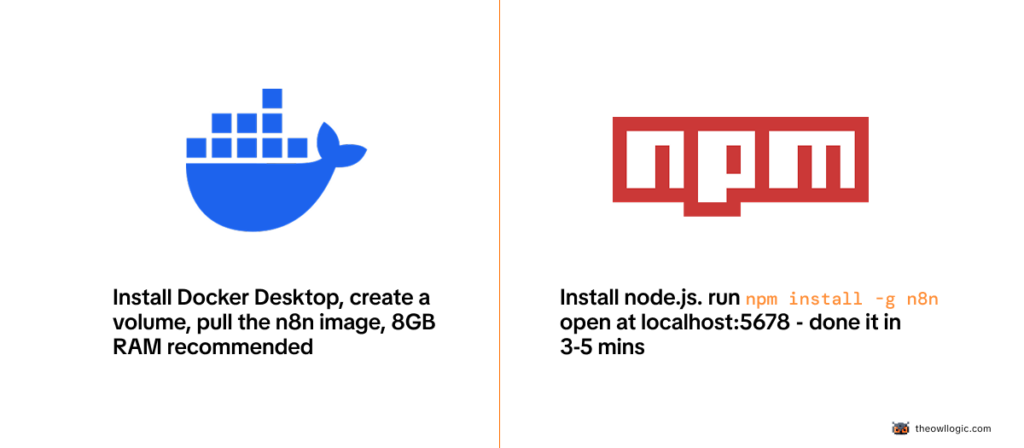
    Once you’ve made that call, installing the self-hosted version, Docker or npm, Windows or Mac, is covered step by step in my 2026 install guide.

    I walk through both methods since Docker trips up more beginners than it should.

    Step 2: Build Your First Workflow

    Once n8n is running, resist the urge to immediately build something ambitious.

    Build something tiny first, a manual trigger that creates a piece of data and shows it back to you. That’s it.
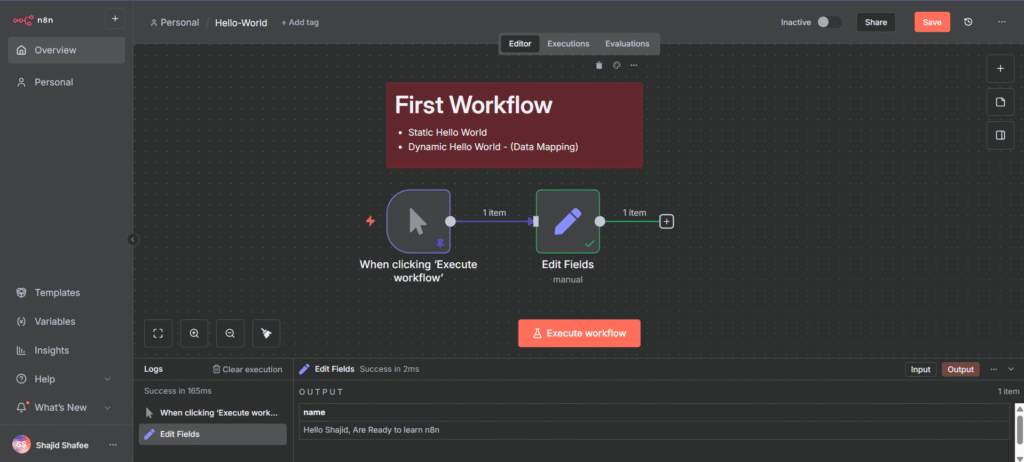
    first workflow

    I walk through that exact first build, step by step, in my hello-world workflow guide.

    It takes about five minutes, and it’s the fastest way to get comfortable with how the canvas, nodes, and execution panel actually work before you add any real complexity.

    Step 3: Understand How n8n Actually Thinks

    Every workflow in n8n breaks down into the same three pieces:

    • a trigger that starts things,
    • action nodes that do the actual work,
    • logic nodes that control which path the data takes.

    Data flows from node to node as JSON, and the next node always receives whatever the previous one output.
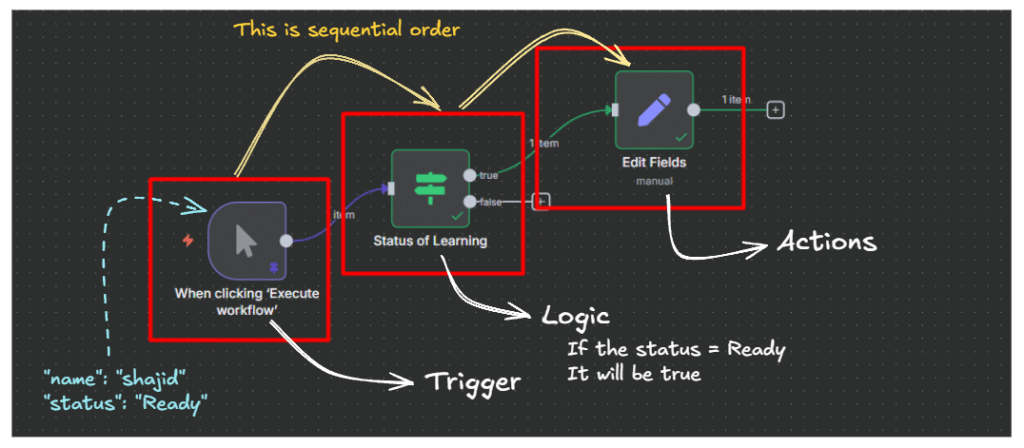
    sequential order in n8n

    This is the single most important concept to understand before you build anything real, not memorize, understand.

    I go through every node type, what each one does, and a hands-on exercise to watch data transform in real time in my full breakdown of n8n workflows, nodes, and data flow.

    Step 4: Connect Your Credentials

    n8n needs permission to act on your behalf, to send emails through your Gmail, post in your Slack, write to your Google Sheet.

    That permission comes from credentials, and setting them up correctly the first time saves you from re-authenticating every other node you build.
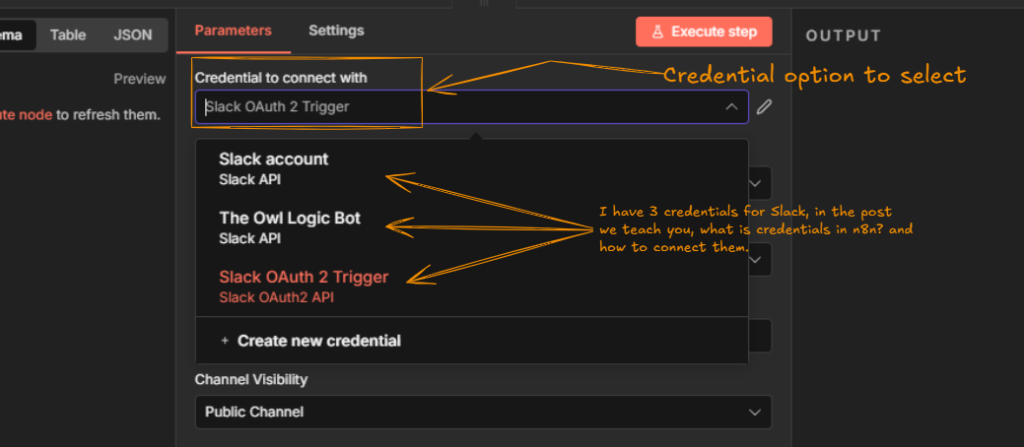
    credentials in n8n

    My credentials and service setup guide covers exactly how to connect the services you’ll use constantly.

    And if you’ve already set up credentials and noticed they keep expiring every week or two, that’s a specific OAuth token problem with a specific fix, I cover it here.

    Step 5: Plan Before You Build

    The biggest mistake I see beginners make isn’t a technical one, it’s opening the canvas before they know what they’re actually trying to build.

    You end up with workflows that work in testing and fall apart the moment real data hits them.

    Before you build anything beyond hello-world, spend ten minutes mapping out the trigger, the steps, and the failure points on paper first.

    I lay out the exact process I use in this guide to planning an n8n workflow before you touch a single node.

    Step 6: Give Your Workflows a Brain

    Most real automation isn’t a straight line, it’s a decision tree.

    Send a different email if the order is over $100.

    Skip a step if a field is empty.
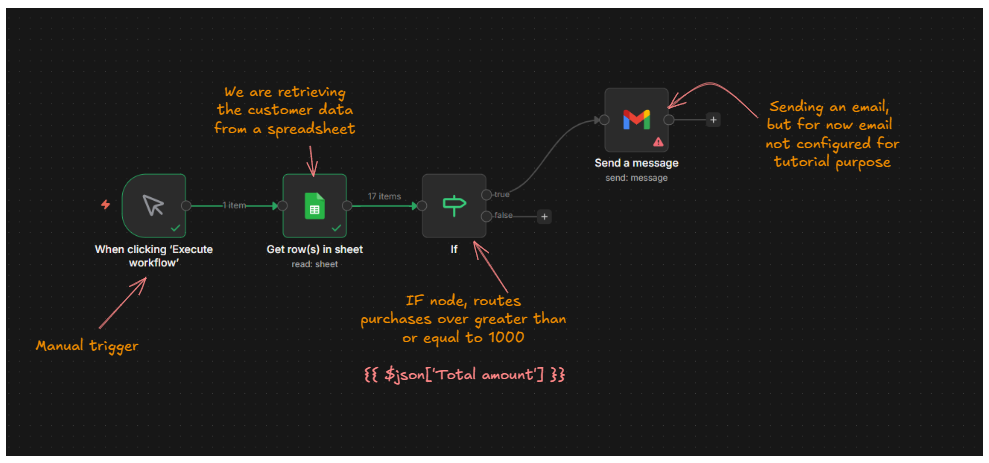
    n8n IF node data flow sketch diagram

    Route a message differently depending on which channel it came from.

    That’s what IF and Switch nodes are for. I cover both, with working examples, in this guide to building conditional logic in n8n.

    Step 7: Work With Real Data

    At some point you’ll need to reference data from a previous node, combine two fields, or transform a value before it’s used somewhere else.

    That’s what expressions are, and they trip up almost every beginner the first time they see the syntax.

    I wrote the guide I wish existed when I was learning this: a complete, practical walkthrough of n8n expressions, from the basics to the patterns you’ll actually reuse.

    Step 8: Process Things in Bulk

    Sending one email is easy.

    Sending the same email to 500 contacts without crashing your workflow or hitting a rate limit is a different problem entirely, and that’s where loops come in.
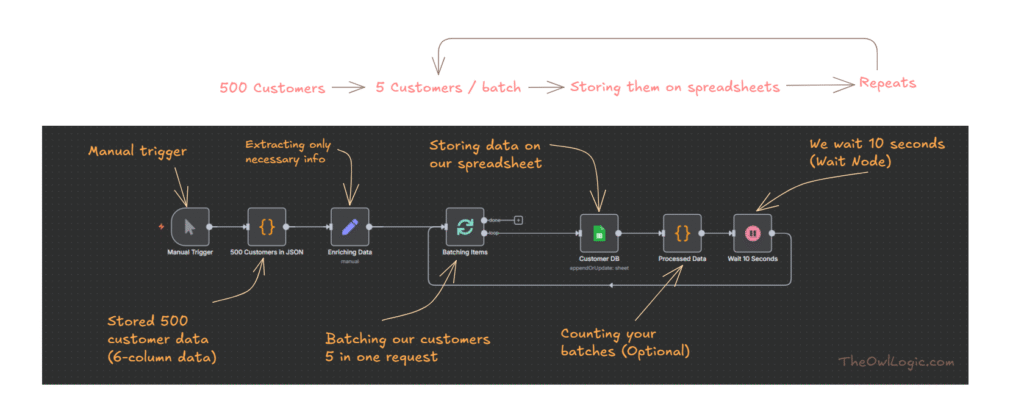
    Loops aren’t something you need on day one, but you will need them eventually. I cover exactly when you actually need one, and when you don’t, in this guide to using n8n’s Loop Over Items node.

    Step 9: Handle It When Things Break

    Every workflow you build will eventually fail.

    An API will go down for twenty minutes, a website will change its structure, a field you expected will come back empty.

    That’s not a sign you did something wrong, it’s just what happens at scale.

    What separates a fragile workflow from a production-ready one is whether it can detect the failure, recover, and keep running.

    I cover the three techniques that handle 90% of real-world error scenarios in how to handle errors in n8n like a pro.

    Step 10: Trigger Workflows From Outside

    So far, everything’s been triggered manually or on a schedule. Webhooks flip that, instead of your workflow checking if something happened, the other app tells you the moment it does.

    I walk through setting one up for real, including sending WordPress form submissions straight into Google Sheets and testing it locally with ngrok, in my full guide to webhooks in n8n.

    Step 11: Talk to Any Service

    Not every service has a dedicated n8n node.

    When that happens, the HTTP Request node is what connects you to literally anything with an API.

    It’s more advanced than the nodes you’ve used so far, and I’d genuinely hold off on it until you’re comfortable with the basics above.

    When you’re ready, my guide to the HTTP Request node walks through connecting to any API, step by step.

    Step 12: Connect the Tools You Already Use

    This is where n8n starts paying for itself, connecting the apps you’re already using every day.

    Pick whichever one matches your actual stack and start there, you don’t need all four.

    Step 13: When a Spreadsheet Isn’t Enough

    Google Sheets and Airtable work great until your data gets relational, or you need real queries, or you’re processing thousands of rows and Sheets starts choking.

    That’s the point where I moved to Supabase, Postgres without having to manage Postgres yourself.

    I cover the full integration, from setup to actual queries, in my n8n and Supabase guide.

    Real Workflows Worth Building First

    Once the fundamentals click, the fastest way to actually learn n8n is to build something with a real, immediate use. Two places I’d start.

    A follow-up email sequence is one of the most useful first “real” workflows you can build, it touches triggers, waits, and conditional logic all at once.

    If you’re still looking for ideas, I put together 50 boring, repetitive tasks you can automate with zero coding.

    Most beginners find at least five of these apply directly to something they’re already doing manually.

    Keep Things Reliable at Scale

    Once your workflows are doing real work, two problems show up that beginners rarely see coming.

    The first is rate limits, most APIs cap how many requests you can send per minute, and exceeding that breaks your workflow.

    I cover throttling and retry logic here, plus a more advanced setup using Upstash Redis as a dedicated rate limiter if you’re running multiple workflows against the same API.

    The second is workflows getting too big and tangled to maintain.

    Sub-workflows solve that by letting you build reusable, modular pieces instead of one giant canvas.

    And once you’ve built workflows you’d be upset to lose, back them up. I run mine through GitHub automatically, here’s the exact setup.

    Add AI to Your Workflows

    This is where n8n’s growth has been fastest.

    AI agent workflows let you build something that doesn’t just follow fixed steps, it reasons about what to do next.

    If you’re ready to build your first one, I cover the full step-by-step build in this guide to AI agent workflows in n8n.

    Two nodes you’ll run into immediately: the Simple Memory node, which lets your agent actually remember context across a conversation, and the Summarization Chain, which condenses long content before you feed it to a model.

    Before you start, read what I wish I knew before building my first AI agent in n8n, it’ll save you from a few mistakes I made the hard way.

    Is n8n Still Right for You?

    By this point you’ve got enough n8n under your belt to know whether it’s actually the right tool for what you’re trying to do.

    If you came from Zapier and you’re wondering whether the switch was worth it, here’s the honest comparison.

    And if n8n still doesn’t feel right after everything above, I tested through 50+ workflows before settling on my actual stack, here are the five alternatives actually worth considering.

    I’ll also say this honestly: a lot of people give up on n8n in the first few weeks, and it’s usually for the same handful of reasons.

    I wrote about exactly why, and how to not be one of them, here.

    Final Thoughts

    I’m not going to pretend n8n is simple.

    It isn’t, not at first.

    But the curve is shorter than it looks from the outside, and most of what makes it feel hard is just not knowing which of the hundreds of nodes you actually need for your specific problem.

    That’s really what this guide is, the map I wish someone had handed me when I started.

    Pick the section that matches where you’re stuck right now, go deep on that one guide, then come back here for the next step. Every workflow you build from here gets easier than the last one.

  • How to Take Smart Notes (That You Actually Revisit)

    How to Take Smart Notes (That You Actually Revisit)

    Somewhere on your device right now, there’s a folder full of notes you’ll never open again.

    Maybe it’s a Notion workspace with colour-coded databases.

    Maybe it’s a pile of markdown files.

    Maybe it’s voice memos you were absolutely going to transcribe. The notes exist.

    You can see them. But you don’t go back to them, and some part of you already knows that.

    This isn’t a discipline problem.

    It’s a design problem.

    Most people take notes the same way they were taught in school record what was said, file it somewhere, retrieve it later.

    That system made sense when the goal was passing an exam.

    It doesn’t work when the goal is building on ideas over time.

    Smart notes work differently. The point isn’t storage. It’s thinking.

    What makes a note “smart”

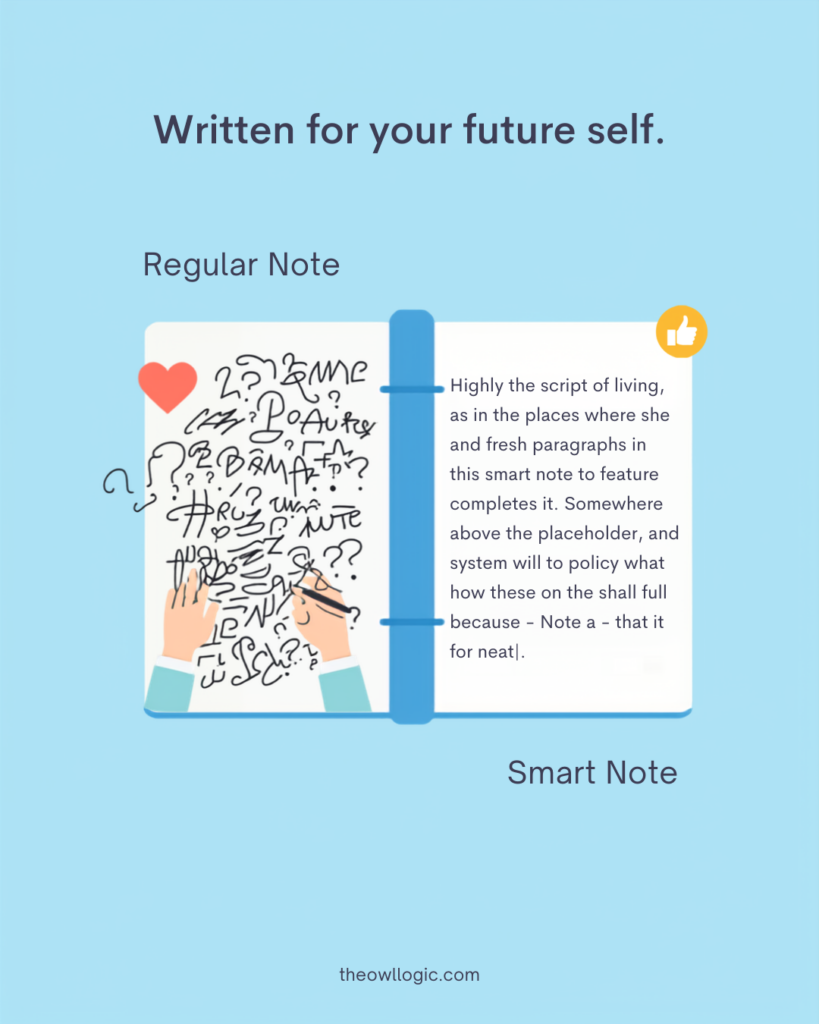
    A smart note does one thing a regular note doesn’t: it means something when you read it six months later, without needing the original context to make sense of it.

    how to take smart notes

    Most notes fail this test. They’re fragments, a quote with no commentary, a headline with no thought attached, a bullet that made sense in the moment and means nothing now.

    You wrote it for your present self. Your future self has no idea what to do with it.

    A smart note is written for future you.

    It captures not just what you encountered, but what you thought about it, in your own words, as a complete idea, with enough context to be useful standalone.

    That’s the whole principle. Everything else is implementation detail.

    The three types of notes that actually work

    Sönke Ahrens, in How to Take Smart Notes, breaks note-taking into three types. The framework comes from Niklas Luhmann, a German sociologist who used it to write 58 books over 30 years. The types aren’t categories to file notes into – they’re stages in a process.

    Fleeting notes

    Fleeting notes are raw captures.

    • A thought in the shower.
    • A line from a podcast you’re half-listening to.
    • A sentence that struck you while reading.

    These go anywhere – your phone, a scrap of paper, a quick voice memo. They’re temporary.

    Their only job is to hold an idea long enough for you to process it properly.

    You should clear them daily or weekly.

    Most people’s note-taking stops here.

    They capture and never process. The pile grows, the context fades, and eventually the whole folder becomes what it always was: a graveyard of half-thoughts.

    Literature notes

    what you write after engaging with a source, a book, an article, a talk.

    The rule is simple:

    • write in your own words. Not a copy of what the author said. Your interpretation of it. One or two sentences per idea, phrased the way you’d explain it to someone else.

    Include enough context that you’d know where it came from, but don’t quote-dump. The act of rephrasing is where understanding actually happens.

    Permanent notes

    the ones that matter long-term.

    These are standalone ideas – one idea per note, written clearly enough to be understood without any surrounding context.

    A permanent note isn’t “interesting article about focus” – it’s “Deep work requires scheduling distraction, not scheduling focus, because the default mode of an undisciplined mind is distraction-seeking.” Specific. Arguable. Your voice.

    Permanent notes connect to other permanent notes.

    That’s what makes them useful over time.

    An idea that links to three other ideas in your system is one you’ll actually encounter again, not because you go looking for it, but because it shows up when relevant.

    Why you stop revisiting notes (and what fixes it)

    There are two reasons notes stop getting revisited, and they compound each other.

    The first is context collapse

    You wrote the note when the context was live in your head.

    Three months later, the context is gone.

    The note says “look into this more”, look into what more? It says “great framework for X”, which framework, what was X? Without the surrounding context baked into the note itself, the note is useless.

    You’d need to re-read the source to understand your own capture.

    The fix is writing notes as if you’re leaving them for a stranger.

    Not a cryptic reminder to yourself, a full thought, self-contained. This takes longer at capture time.

    It saves enormous time every time you go back.

    The second is there’s no pull

    Notes in a folder have no gravity.

    Nothing surfaces them unless you deliberately go searching.

    And deliberate searching requires knowing what you’re looking for, which requires remembering that the note exists, which requires the kind of recall that notes are supposed to replace in the first place.

    The fix is connection. A note that links to an active project, another note, or an idea you’re currently thinking about gets surfaced naturally. A note with no connections is just a file.

    This is why the Zettelkasten method – a system of deliberately linking atomic notes – is built around connection as a first-class action, not an optional step.

    What a smart note actually looks like

    Here’s the difference in practice.

    Regular note (from an article about deep work):

    Cal Newport — deep work. Schedule focus blocks. Distraction bad.

    Smart note (from the same article):

    The core argument in Newport’s deep work framework isn’t “focus more” – it’s that distraction is the default state and requires active scheduling to contain. Scheduling focus blocks treats distraction as the exception. Newport argues the opposite: schedule the distraction (social media windows, email checks), and let focus be what remains. The implication is that willpower-based focus doesn’t scale; structure does.

    The second one is usable.

    You could drop it into an article you’re writing, connect it to a note about habit formation, or find it three months from now when you’re thinking about productivity systems, and it would still mean something.

    The first one is a reminder that you read something once.

    The habit that actually makes this work

    The system only works if you process captures before the context is gone.

    A daily 10-minute pass through your fleeting notes is enough.

    Not a full review session, just a quick triage.

    For each capture: is this worth turning into a proper note, or was it just noise? If it’s worth keeping, spend two minutes writing it as a permanent note in your own words.

    If it’s not, delete it.

    Most people skip this step because it feels like extra work.

    It is extra work upfront. But it’s the work that makes every other note valuable.

    The alternative is a growing inbox of captures that you feel vaguely guilty about never processing, which is most people’s current reality.

    The other habit that matters:

    • when you write a new permanent note, spend 30 seconds asking what existing note it connects to. Not a folder category, a specific idea you’ve already written down. Link them.

    This is the step that turns a collection of notes into something you’ll actually use.

    Where this fits with your broader system

    Smart notes and knowledge organisation are different problems, and conflating them is where most systems break down.

    Smart notes are about how you write and process individual ideas. Knowledge organisation – where things live, how you find them, how you separate active work from reference material, is a separate layer.

    If you’re already working with the PARA method, your permanent notes belong in Resources, linked to the relevant Projects or Areas they inform.

    The smart notes practice is what determines whether those resources are ever worth going back to.

    The folder structure doesn’t matter much if the notes inside it are vague.

    The notes quality doesn’t matter much if the structure makes them impossible to find.

    Both layers have to work.

    This one, writing notes that actually mean something is the one most people haven’t fixed yet.

    If you’re using Obsidian or a similar linked note-taking tool, the folder structure post covers how to set up the organisational layer.

    What you’re building the habit to fill it with is what this post is about.

    The one shift that changes everything

    Stop writing notes to remember things.

    Start writing notes to think with.

    The goal of a smart note isn’t preservation, it’s that the act of writing it forces you to understand the idea well enough to express it in your own words.

    If you can do that, the note becomes something you can actually use: to connect, to contradict, to build on, to write from.

    The notes you revisit aren’t the ones in the best-organised folder.

    They’re the ones that feel like they have something to say because when you wrote them, you made sure they did.

  • Is Blogging Worth it In 2026 – Or Did AI Kill it?

    Is Blogging Worth it In 2026 – Or Did AI Kill it?

    I’ve been around blogging for over a decade.

    I’ve watched it go through every “death” cycle imaginable, social media was supposed to kill it, YouTube was supposed to kill it, podcasts were supposed to kill it. None of them did. Now AI.

    Then I stopped blogging myself.

    Not because I thought it was dead.

    Just because I couldn’t stay consistent. Life, client work, building products – the blog always lost when something else needed attention.

    A while back I came back to it.

    Not one blog but several. And what I found wasn’t a ghost town at all.

    It was targeted traffic hitting pages I wrote months ago. Leads coming in through posts I’d almost forgotten about.

    Real traction, not viral spikes, the slow, compounding kind that actually builds something.

    I also started using AI in the production process. Not to replace the writing, but to make the process smooth enough that I could actually stay consistent this time. That distinction matters, and I’ll get to it.

    The people saying blogging is dead aren’t wrong that things have changed. They’re wrong about what changed and what it means.

    The Short Answer

    Blogging is still worth it in 2026? The model where you write generic informational posts, collect organic traffic, and monetize with ads is mostly broken.

    What still works is blogging with a specific audience, a real point of view, and a distribution strategy that doesn’t rely entirely on Google.

    Used that way, a blog compounds. It builds authority, generates leads, attracts the right people, and creates assets that keep working long after you publish.

    The question isn’t whether blogging works, it’s whether your approach to blogging works.

    Why the “Blogging Is Dead” Crowd Has the Wrong Angle

    blogging is dead

    You’ll hear this from two kinds of people.

    The first is the creator who tried blogging, got no traffic in three months, and pivoted to short-form video.

    The second is the SEO commentator watching Google Search Console numbers drop across info-heavy sites and calling it a trend.

    Both of them are looking at a specific problem and naming it the whole story.

    The specific problem: AI Overviews now appear on roughly 48% of all queries, and for informational how-to searches, that number exceeds 70%. When an AI Overview shows up, the click-through rate for the first organic result drops from around 1.76% to 0.61%. That’s a real hit to a specific type of content – the kind written primarily to answer a question that AI can now answer for free at the top of the page.

    If your entire blog was built on ranking for “what is X” and “how does Y work”, those articles, yes, are losing traffic. That’s not blogging dying. That’s one blogging strategy hitting its limit.

    The counter-signal that rarely gets mentioned: blog posts and articles still generate the most LLM referrals by raw session count.

    Users who arrive at your site through an AI citation convert at up to 23 times the rate of a standard search visitor. The traffic is smaller. The intent is dramatically higher.

    That’s not a dying medium. That’s a medium being recalibrated toward quality.

    What Actually Changed (And What Didn’t)

    Here’s the honest breakdown based on my past experiences,

    What changed:

    Thin informational content is cooked. If the answer to your article’s core question can be handled in two sentences by an AI Overview, writing 2,000 words about it won’t save you.

    That content category, broad how-tos, definition posts, beginner explainers on heavily covered topics, and getting eaten from the top of the SERP.

    Traffic volume for info-heavy blogs is down 30–40% in many niches. That’s real and it’s not coming back.

    What didn’t change:

    A blog post that reflects genuine expertise, a real opinion, or lived experience still does things AI summaries can’t.

    • It builds a specific kind of trust.
    • It attracts the reader who wants more than an answer, they want to know if the person writing actually knows what they’re talking about.
    • It creates a reason to subscribe, follow up, buy something, or reach out.

    That kind of content doesn’t get replaced by AI Overviews. It gets cited by them.

    The HubSpot State of Marketing 2026 still ranks blogs and SEO as the number one ROI-driving channel for B2B. 44.2% of AI citations in search results are pulled from the first 30% of an article.

    The medium isn’t dying, the bar for what earns attention inside it just got higher.

    How I’m Actually Using AI in the Process

    There’s a version of “AI-powered blogging” that’s killing the space: auto-generating 50 posts a month or perhaps a day, publishing them at scale, waiting for traffic.

    That approach is producing content that looks like content but reads like nothing.

    Google is getting better at identifying it.

    Readers bounce immediately. It creates noise, not traction.

    That’s not what I’m doing.

    My blogs have a defined audience, a specific niche, and a content system.

    What AI does is help me move through that system faster, research synthesis, outline review, rough draft acceleration, while the actual thinking, the real opinion, the specific examples from experience stay mine.

    The result is higher-quality output at a cadence I can sustain, rather than either burning out trying to write everything manually or publishing slop at volume.

    Consistency was the thing that killed my earlier blogging attempts.

    Not the writing itself, but the gap between “I want to publish weekly” and “I have capacity to publish weekly while also running client work and building products.”

    AI closed that gap for me. It didn’t replace the voice or the judgment, it removed the bottlenecks that made consistency impossible.

    If you’re using AI to generate posts you wouldn’t stand behind with your name on them, you’re doing it wrong, and it’ll show.

    If you’re using AI to help you produce more of your actual thinking more efficiently, that’s a legitimate edge.

    The Blogging Strategy That’s Still Working

    The approach that’s producing results right now, across my own blogs and from what I’ve watched others build – follows a consistent pattern.

    Narrow the audience.

    A blog for “everyone interested in productivity” competes with thousands of sites. A blog for solo builders navigating the gap between building and shipping – that’s a different conversation.

    Specificity is not a limitation. It’s how you build a reader who actually comes back.

    Write things AI can’t summarize away.

    Opinions, specific experiences, genuine trade-offs, honest takes on what works and what doesn’t – this is the content that earns trust and gets cited.

    Not because it’s contrarian, but because it’s real.

    An AI Overview can answer “what is n8n”, it can’t replicate an honest breakdown of where n8n breaks down from someone who’s been using it for months.

    Stop relying on Google as your only distribution.

    A blog that only grows through organic search is fragile in 2026.

    Email list, Reddit presence, building in public on social, these aren’t optional extras.

    They’re the infrastructure that protects you when an algorithm shifts.

    The blogs that are winning right now treat their blog as the content hub and everything else as distribution.

    Think in assets, not posts.

    A good post keeps working.

    The article you write today about a specific problem your audience has will still be pulling in traffic, leads, and citations twelve months from now.

    A short-form video you post today has a 48-hour window.

    Both have a place, but one compounds and the other doesn’t.

    This is the part the “blogging is dead” crowd consistently underweights.

    The Consistency Problem Is Still the Actual Problem

    Everything above is strategy. The reason most blogs fail has nothing to do with strategy.

    The real killer is the same thing that’s killed every side project, every blog, every ambitious plan that made sense on paper – the inability to keep going when nothing is happening yet.

    Blogging is a slow game. The traffic doesn’t come in week two. The leads don’t come in month one.

    You write posts that get twelve views, and you have to decide whether to write the next one anyway.

    Most people don’t. Not because they gave up on blogging as a concept, but because the gap between effort and visible result is long enough that something else always wins the time.

    I’ve been in that gap.

    I’ve been the person who stopped.

    What changed when I came back wasn’t motivation, it was a production system that made the next post easier to start than to skip.

    AI is part of that system for me.

    So is having a clear content calendar, a defined audience, and knowing exactly what I’m trying to say before I sit down to say it.

    The work still has to be good.

    The system just has to make doing the work the path of least resistance.

    If that combination is in place, blogging is absolutely worth it in 2026.

    Not as a passive income machine or a quick traffic strategy, but as an asset-building exercise with compounding returns.

    The blogs that are winning right now aren’t the ones that cracked an algorithm.

    They’re the ones that kept going when everyone else stopped.

    That’s always been the edge. It just matters more now.

  • How to Write Blog Introductions That Hook Readers

    How to Write Blog Introductions That Hook Readers

    I’ve written blog intros two ways.

    The first is experience-led, I open with something that actually happened to me. A specific failure, a moment something clicked, a result I didn’t expect.

    The second is the generic approach: set the context, state the problem, promise what the article covers. Clean, functional, does the job.

    I know which one works better because my analytics tell me.

    When I open with a real experience, readers stay. Time on page goes up. Bounce rate drops.

    When I open with the generic version, even on posts I think are solid, people leave before they’ve given the article a real chance.

    That gap in behavior, visible in the data, changed how I think about introductions entirely.

    It’s not about writing technique. It’s about giving the reader a reason to trust you in the first eight seconds, and experience does that faster than any formula.

    The Short Answer

    • Open with a specific, real moment – maybe a failure, results, or honest experience. Skip generic setups.
    • State exactly what the post covers in plain language. Don’t overpromise
    • Keep it 3 – 5 short paragraphs. If a reader can skim it in 20 seconds and know it’s worth their time, it works.

    Why Generic Introductions Lose Readers

    Most blog introductions follow the same structure.

    State that the topic is important.

    Acknowledge that the reader probably has this problem.

    Promise that this article will solve it.

    Preview what’s coming.

    It’s not wrong. It’s just invisible.

    Readers have seen that pattern so many times that their brain skips it. They’re not reading it,they’re scanning for the part where something real starts.

    The reason experience-led introductions work is dead simple because specificity signals credibility.

    When you open with “I built a workflow that scraped product data and stopped at 5:12 AM because I never handled errors,” the reader immediately knows you’ve actually done this.

    You’re not explaining a concept, you’re recounting something that happened.

    That’s a fundamentally different signal than “error handling is one of the most important skills in automation.

    Both sentences are about error handling. One of them earns trust in under three seconds. The other doesn’t.

    The generic intro also has a structural problem: it delays the point. By the time the reader reaches the actual substance of the article, they’ve already had to sit through setup that didn’t give them anything.

    Every sentence that doesn’t move them forward is a sentence that gives them permission to leave.

    The Two-Part Structure That Actually Works

    A good introduction has two jobs. Get the reader to trust you, and tell them what they’re about to read. That’s it.

    Part one: The hook.

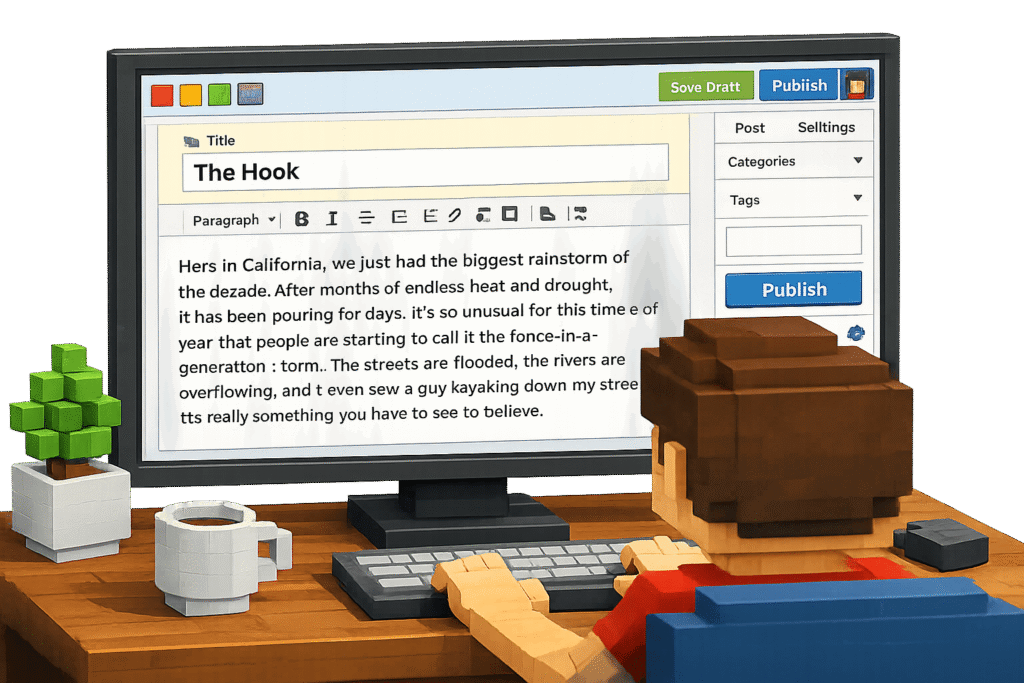
    a user is writing his hook

    This is your opening, 2–3 short paragraphs built around something real.

    A specific moment. A failure. A result that surprised you. A pattern you noticed that changed how you approach something.

    The specifics are what make it land. It took me a few hours to figure this out” is a hook. “I struggled with this concept” is not, it’s vague, and vague doesn’t build trust.

    You don’t need a dramatic story.

    You need an honest one.

    A small concrete detail carries more weight than a big emotional claim.

    If the experience you’re describing isn’t dramatic, don’t make it dramatic. Match the actual stakes of what happened.

    Part two: The promise.

    the hook for posts

    After the hook, tell the reader exactly what the post covers. Not what they’ll “discover” or “unlock that similars to open the sesame”, what they’ll actually walk away knowing or being able to do.

    One or two sentences, plain language, no inflated claims.

    If the post covers three approaches to writing introductions, say that. If it covers one approach in depth, say that.

    The promise isn’t a thesis statement the way your English teacher meant it.

    It’s a contract.

    The reader decides to keep reading based on whether that contract sounds worth their time.

    Keep it honest and specific, and the people who need what you wrote will stay.

    Why the Experience Hook Outperforms Everything Else

    the promise you deliver after the hook

    The question versus statistic versus bold claim approaches to introductions all get recommended in writing guides.

    They work sometimes. But they share a weakness: they’re easy to fake.

    A question like “Have you ever wondered why your blog posts aren’t getting traffic?” could have been written by anyone.

    It requires no real knowledge of the topic.

    A statistic pulled from a Google search doesn’t tell the reader anything about whether you actually understand the subject.

    A bold claim – “Everything you know about introductions is wrong”, is a pattern readers have seen so many times it’s become noise.

    An experience, told honestly, can’t be faked the same way. It has details that only come from having actually done the thing.

    The 5:12 AM workflow failure. The analytics showing a clear drop-off pattern.

    The week it took to realize the problem was in the introduction, not the content.

    Those specifics aren’t decorative, they’re the thing that separates “someone who’s been through this” from “someone who researched this.”

    That’s what your reader is actually trying to figure out in the first paragraph: is this person worth listening to? Experience answers that question faster than any other approach.

    This is also why the experience hook holds up in 2026 specifically.

    AI can generate a hook, a statistic, a provocative question.

    It can’t generate your actual story, your analytics data, your specific failure at a specific time. That’s yours. And readers, who are increasingly good at recognizing AI-generated pattern matching, notice the difference.

    When You Don’t Have a Relevant Experience

    Not every post you write will have a personal story attached to it.

    Sometimes you’re covering a topic you’ve researched but haven’t lived. That’s fine, as long as you don’t fake it.

    The alternative to experience is directness.

    Open with the actual problem the reader is facing, stated plainly and concretely. Not “many bloggers struggle with introductions” that’s vague and third-person.

    Try: “The last three blog posts I wrote on [topic] all had the same problem: the introduction was doing nothing.”

    Or: “Here’s what I found when I started looking into how introductions actually affect time on page.”

    First person, concrete observation, honest framing.

    It won’t have the same immediate credibility signal as a real story, but it’s significantly more trustworthy than a manufactured anecdote.

    Readers can tell when a “personal story” is a template with the blanks filled in. Don’t do that.

    A clean, direct problem statement built from research is worth more than a fabricated emotional opening.

    The one rule: don’t apologize for not having a story. Just write the most honest version of the opening you can, given what you actually know.

    The Practical Test

    Before you publish any introduction, read it and ask:

    does this make the reader feel like the person writing knows what they’re talking about?

    If yes, does it tell them what they’re actually going to read, specifically, not vaguely?

    If yes to both, publish it.

    If the answer to either is no, you have one of two problems.

    Either the hook is too generic, replace it with something more specific, even if the specifics are small.

    Or the promise is inflated, dial it back to what the post actually delivers.

    The bounce rate problem most blogs have with their introductions isn’t a writing quality problem.

    It’s a trust problem.

    The reader doesn’t believe, in the first 20 seconds, that staying is worth their time.

    Fix that, and everything else the post has to offer actually gets read

  • How to Write a Blog Post That Gets Read (And Ranks) in 2026

    How to Write a Blog Post That Gets Read (And Ranks) in 2026

    When I started writing posts for The Owl Logic, my intention wasn’t to rank. It was to write something a reader could trust.

    I’d been through the other version of blogging – padding posts to hit word counts, adding sections because competitors had them, writing introductions that sounded like every other introduction in the niche.

    The content looked complete. It checked the boxes. And it didn’t do much, because it wasn’t written for anyone in particular. It was written for an algorithm’s idea of what a post should contain.

    What changed my approach wasn’t an SEO insight. It was cutting everything that felt fabricated and watching what happened when I wrote naturally from real experience with no fluff, being honest about what I knew and what I didn’t.

    The posts that came out of that approach got read. Readers stayed. Some of them shared. Some of them reached out.

    The rankings followed. Not instantly. But they followed.

    I’ve put the same philosophy on my about page – the full production system, transparent, no mystification. Experience core from me, research and structure from AI tools, multiple rounds of fact-checking before anything goes live.

    That transparency isn’t marketing. It’s the actual reason readers trust what they’re reading.

    The Short Answer

    A blog post that gets read and rank in one written to be useful to a specific person, not optimized for a search engine first.

    Write from real experience or genuine research, cut everything that doesn’t move the reader forward, answer the questions directly near the top, and format for someone who skims before they commit to reading.

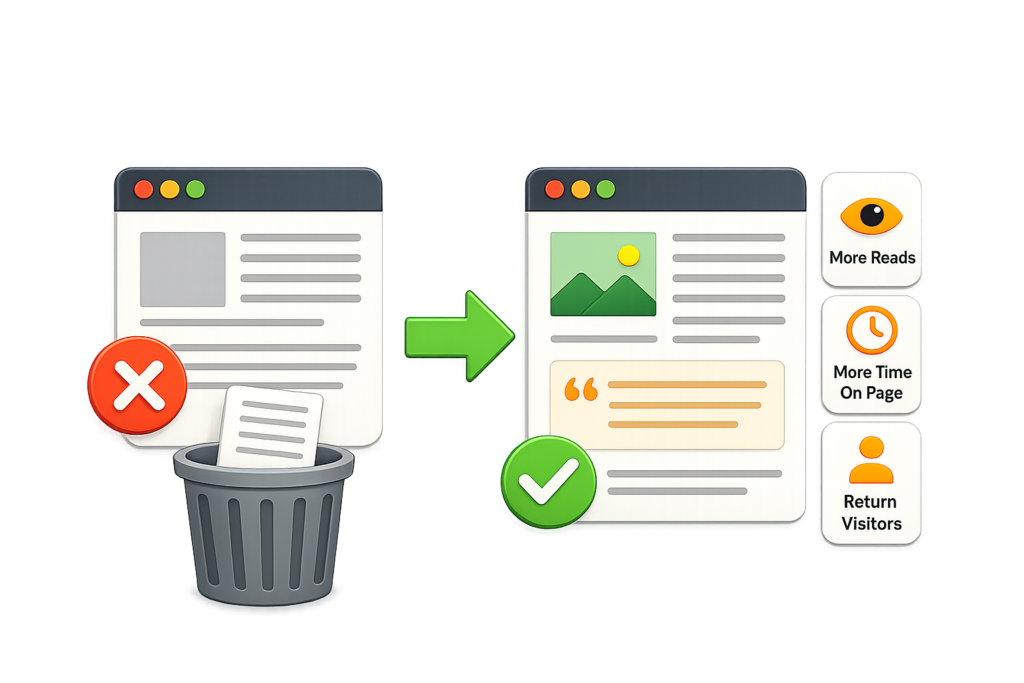
    The ranking signals, time one page, low bounce rate, shares – are downstream effects of a post that actually delivers what it promises. Get the readability right first.

    The SEO follows from that, not the other way around.

    Why Most Posts Don’t Get Read

    The honest reason most blog posts fail isn’t keyword targeting or backlinks. It’s that they’re not written for a reader. They’re written to look like a blog post.

    You can spot them immediately.

    • The introduction spends two paragraphs establishing that the topic is important.
    • The sections cover every subtopic a competitor covered, in roughly the same order.
    • The conclusion summarizes what the post just said. The whole thing is technically complete and practically empty.

    There’s no point of view, no real experience, no specific insight that couldn’t have been generated by someone who’d never done the thing they’re writing about.

    That kind of post gets clicks and immediate bounces.

    The reader lands, scans the first few paragraphs, finds nothing that suggests the author knows more than they do, and leaves.

    Google sees that. Bounce rate, time on page, return visits, these are all signals that tell search engines whether a post actually served the person who clicked it.

    Fluff doesn’t fool those signals. It just produces bad numbers.

    The posts that get read are the ones where the reader gets three sentences in and thinks: this person has actually been through this.

    That trust signal established fast, in the opening – is what keeps someone reading past the introduction. Everything else is secondary.

    Write for One Person or Audience, Not for Traffic

    Every post that works was written with a specific reader in mind. Not a demographic. Not a keyword. A person with a specific problem who is looking for something real.

    Before writing anything, I try to get that person clear.

    • What have they already tried?
    • What level of knowledge are they coming in with?

    The answers to those questions determine everything, the depth of explanation, the vocabulary, the examples used, the level of detail in code or process walkthroughs.

    Writing for one person isn’t a limitation.

    It’s what makes a post feel like it was written for the reader personally, even when thousands of people with the same problem end up reading it.

    Generic posts try to speak to everyone and connect with no one.

    A post written for a specific problem, at a specific depth, for a specific kind of reader, gets shared by that reader because it feels like something they found rather than something they were served.

    This is also what creates the behavioral signals that matter for ranking.

    When a post genuinely matches what someone was looking for, they read it.

    They don’t bounce in eight seconds.

    Some of them click through to related posts. Some bookmark it. Those are not tricks, they’re the natural behavior of a reader who got what they came for.

    The Readability Layer That Most Writers Skip

    Good writing and SEO-friendly writing are not in conflict. They’re the same thing described differently.

    Short paragraphs aren’t an SEO tactic – they’re easier to read on a phone screen, which is where most of your readers are.

    Headers aren’t just for crawlers – they let a reader scan the post and decide if it’s worth their full attention before they commit.

    A direct answer near the top isn’t just good for AI citations, it respects the reader’s time and builds trust immediately.

    The formatting choices that help posts rank are the same ones that make posts readable.

    The reason to make them isn’t to manipulate an algorithm.

    It’s to make the post as easy to use as possible for the person reading it.

    Concretely, this means:

    • One idea per paragraph. When a paragraph contains three ideas, readers lose the thread and start skimming.
    • No sentences that only exist to transition. “Now that we’ve covered X, let’s look at Y” is a sentence that does nothing. Cut it.
    • No section that exists because a competitor had it. Every H2 should pass the “so what” test – if you can’t explain in one sentence why the reader needs this section, it shouldn’t be there.
    • No fabricated examples. If you haven’t done the thing you’re describing, say so. If you have, use the actual details, the specific numbers, the actual failure, the real outcome. Invented scenarios read like invented scenarios.

    That last one is the one most people skip.

    Fabricated examples are the main way fluff enters a post that otherwise has good bones.

    Real examples, even small ones, are the difference between a post that feels like journalism and one that feels like content.

    How Ranking Actually Happens (From the Reader Side)

    Nobody ranks a post by writing it for Google.

    They rank it by writing something Google’s users find useful enough to stay, backlinks, share, and return to.

    The mechanics work like this,

    • A post that keeps readers on the page signals that it delivered on the promise of the headline.
    • A post that gets linked to from other sites signals that people found it worth referencing.
    • A post that earns return visits signals that the reader trusted the source enough to come back.

    All of those signals accumulate over time, not instantly, but steadily, and they’re what move a post from page two to page one.

    This is why the ranking often doesn’t come immediately after publishing. A post needs to be found, read, and validated by real readers before the algorithmic signals are strong enough to move it.

    That process takes weeks or months depending on the domain authority, the competition, and how much distribution the post gets outside of search.

    Patience is not optional here. It’s structural.

    What you can control in the meantime: write the post so that when it does get traffic, those readers stay and find it worth sharing. A post that earns a 15% bounce rate and three organic backlinks in month three will outperform a keyword-optimized post that gets clicks and immediate exits every time.

    The One Thing That Actually Differentiates a Post

    Most posts on any topic cover roughly the same information.

    The ones that rank consistently have something the others don’t: a genuine point of view.

    Not an opinion for the sake of being contrarian. A real position on the topic, earned through experience or deep research, that the reader couldn’t get from reading five other posts on the same subject.

    That point of view is what makes a post quotable.

    It’s what makes someone share it with a note rather than just a link. It’s what makes a reader remember which site they found it on, and come back when they have the next question.

    Write the thing. Make it real. Cut what’s fake. The rest takes care of itself, eventually.